Generating 715 Chatbot Actions From a Live UI in One Month
A RAG chatbot is only as good as its data. When the team had spent months brainstorming and produced exactly 3 hand-crafted actions, I built a pipeline that generated 715 in one month, by capturing the application's own UI as structured data.
The Problem
The project is a RAG-based chatbot for a large Swiss defense client. The chatbot needs to guide users through a feature-rich HR and logistics web portal: hundreds of screens, forms, and workflows across 9 modules serving 12 000 users.
The problem: the portal's documentation was sparse and outdated. The chatbot had almost no reliable data to work with. The team tried writing action definitions manually, documenting each workflow step by step, screen by screen. After months of discussion and effort, the output was 3 actions.
The plan for 2026 was to slowly build out action coverage module by module across the entire year. At that rate, full coverage was a distant target.
I thought there had to be a better way.
The Insight
The webapp frontend already contains the information we need. Every menu, every button, every form: the entire workflow structure is encoded in the UI's navigation hierarchy. Instead of documenting the application from the outside, why not capture the UI itself and transform it into structured action data?
I researched extensively and found no existing tools or approaches for this kind of UI-to-action extraction. No libraries, no papers, no prior art. This would have to be built from scratch.
The idea met skepticism from project leads who doubted it was feasible. I decided to build a prototype and let the results speak.
The Approach
The system has four components working in sequence:
| Component | Purpose |
|---|---|
| Bookmarklet | Records UI clicks in the browser and builds a hierarchical action tree |
| Tree Host Server | Persists captured trees as JSONL and serves a live tree viewer |
| Action Generation | Extracts paths from the tree and generates AI summaries |
| Localization | Translates all actions and summaries into French and Italian |
1. Capturing the UI Tree
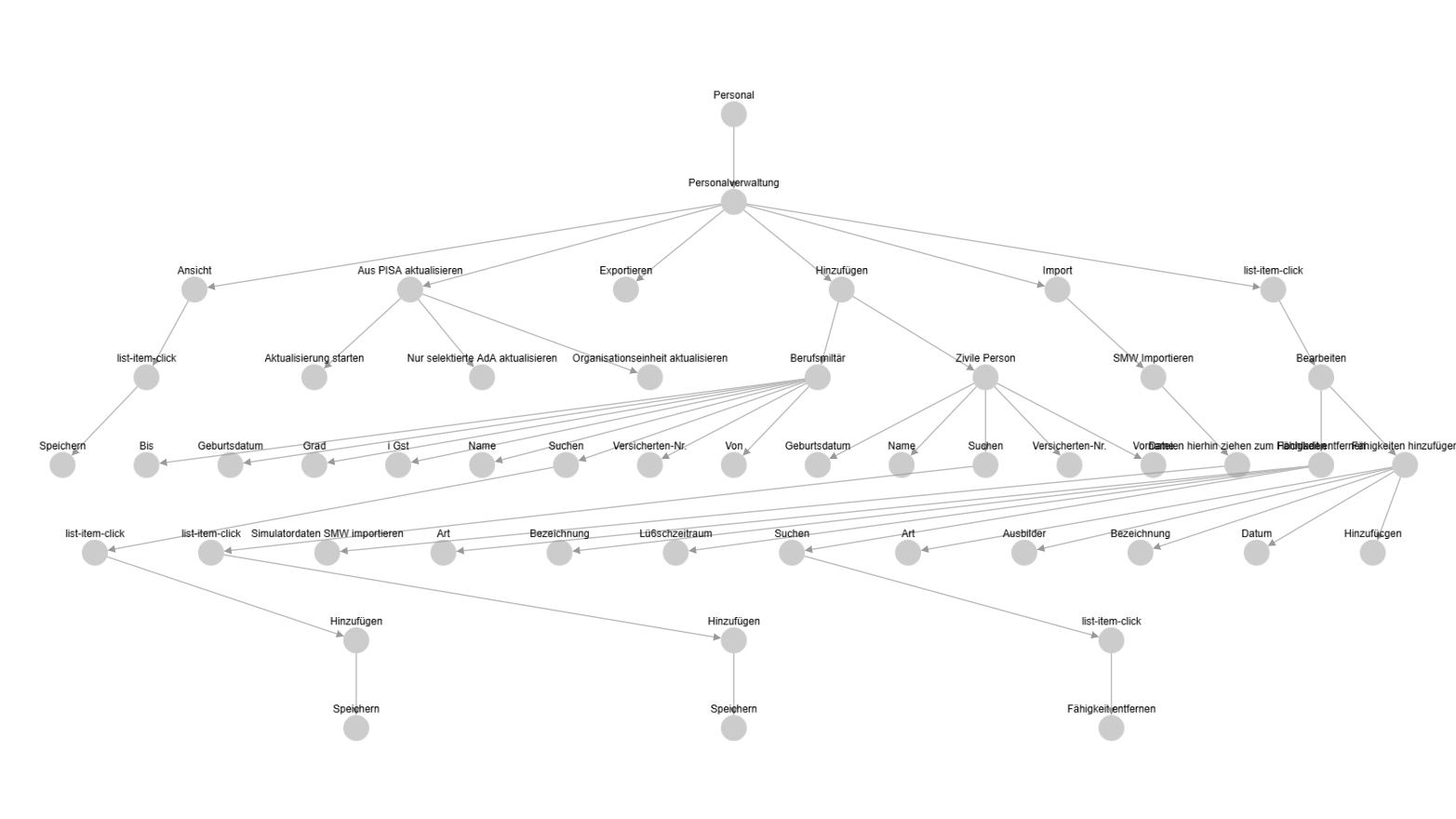
I built a JavaScript bookmarklet that injects a recording panel into any web page. The workflow is simple: navigate to a screen, then Alt+Click on UI elements to record them as actions. The bookmarklet tracks the navigation hierarchy; each click is placed in the tree under its parent path, building up a complete map of the application's structure.
Additional shortcuts handle edge cases: Ctrl+Click adds an element to the current path, Ctrl+Shift+Click removes the last segment, and a mouse wheel cycles through action types (click, form-fill, list-item-click, list-item-double-click).
One technical hurdle: the portal's Content-Security-Policy blocked bookmarklet injection. The workaround was a browser extension that temporarily disables CSP during capture sessions.
Using this approach, I clicked through the entire web portal in one week (every module, every screen, every workflow), building a complete action tree.
2. The Tree Host Server
Captured actions are sent to a FastAPI server that persists them as JSONL files: one line per action, append-only, simple to inspect and version. The server also hosts a live tree viewer built with Cytoscape.js and WebSocket updates, so you can watch the tree grow in real time as you click through the application.
3. AI Action Generation
With the complete UI tree captured, the generation pipeline processes it in stages:
JSONL Tree Data → Path Extraction → Azure OpenAI Summaries → Trilingual Localization
    ↓                                                              ↓
Structured Paths    →    German Descriptions + Keywords    →    FR/IT Translations
    ↓                                                              ↓
                    Final Action JSON → RAG Ingestion
First, paths are extracted from the JSONL tree structure; each leaf node becomes an action with its full navigation path. Then Azure OpenAI generates German-language summaries, descriptions, and search keywords for each action. Finally, a localization pipeline translates everything into French and Italian, producing a complete trilingual action set ready for RAG ingestion.
Results
- 715 structured actions covering the entire web portal, up from 3 manual actions
- Delivered within one month, beating the year-long timeline planned for 2026
- Customer was "excited and surprised" by the coverage and quality
- Directly improved chatbot answer accuracy by providing reliable, structured data for every workflow
- Other customers are now requesting the same approach for their portals
- Received a salary raise in recognition of the contribution
Key Design Decisions
Why a bookmarklet over automated crawling? The portal uses complex Angular routing, role-based access, and dynamic content that makes automated crawling unreliable. A human operator clicking through the UI captures the actual user experience, including screens that only appear after specific state changes. The bookmarklet makes this manual process efficient by recording everything into a structured tree automatically.
Why JSONL over a database? JSONL is append-only, human-readable, trivially versionable with git, and requires zero infrastructure. For a capture-once pipeline, these properties matter more than query performance. You can inspect the raw data with any text editor, diff changes between sessions, and recover from errors by editing a text file.
Why LLM localization over human translation? The portal serves German, French, and Italian-speaking users across Switzerland. With 715 actions, human translation would take weeks and cost thousands. Azure OpenAI handles the domain-specific terminology well because the translations are short, structured, and contextually constrained: action titles and step descriptions, not free-form text.
Takeaways
-
When the data doesn't exist, build a pipeline to generate it. The team was stuck because they were trying to write data manually. The breakthrough was reframing the problem: don't document the application, capture it.
-
Novel problems demand novel tooling. There was no off-the-shelf solution for UI-to-action extraction. Sometimes the highest-leverage move is building the tool that doesn't exist yet, rather than forcing an existing tool to fit.
-
Prototype early, let results speak. Skepticism from leads evaporated once the pipeline produced hundreds of actions in its first run. A working demo is worth more than any slide deck.
The pipeline is now being adapted for other customer portals; the same bookmarklet-to-action approach works for any web application with a navigable UI hierarchy.